
Salesforce Bulk API 2.0 vs Bulk API 1.0: The Ultimate Developer & Architect Guide
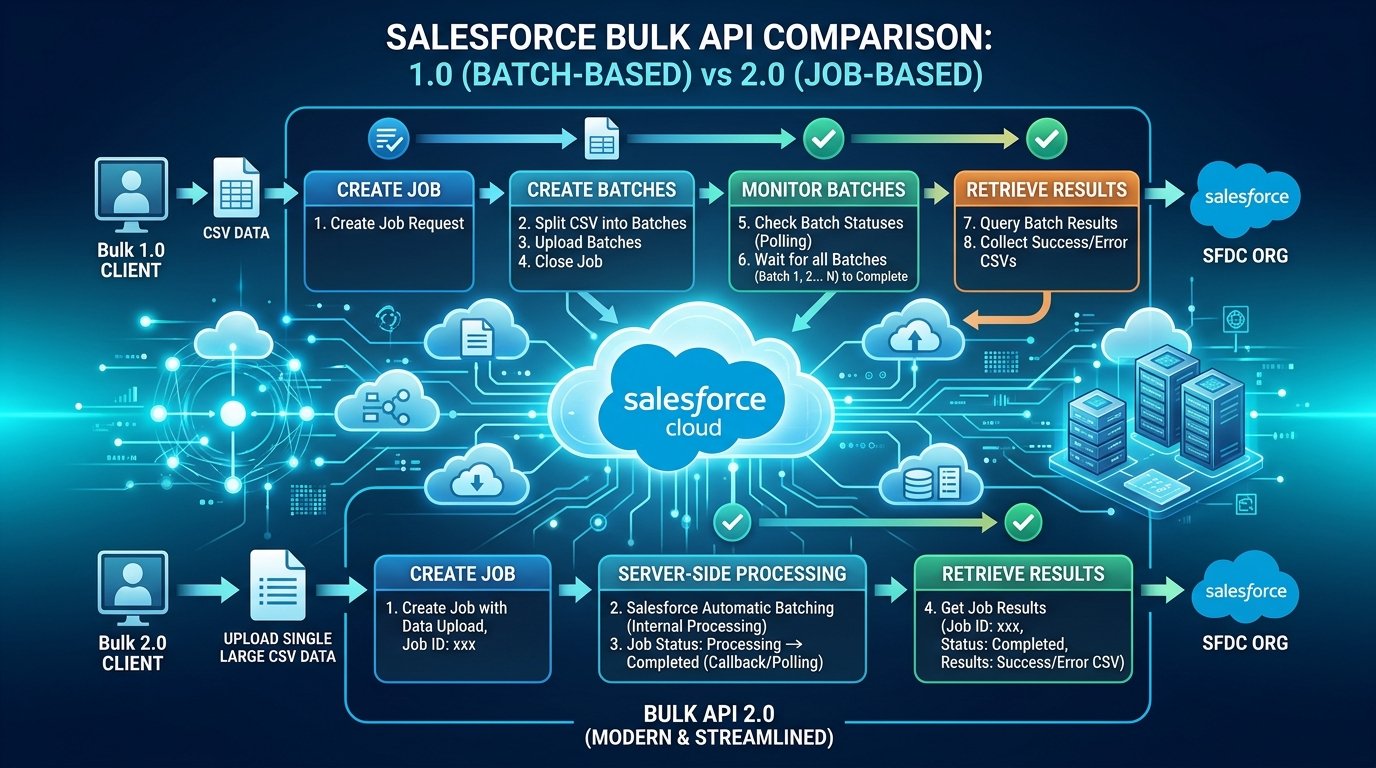
When moving millions of records into or out of Salesforce, choosing the wrong API architecture can cause severe execution bottlenecks, governor limit breaches, complex client-side retry logic, and hours of integration downtime. For over a decade, Bulk API 1.0 was the workhorse for high-volume data operations. However, Bulk API 2.0 fundamentally reimagined how Salesforce processes massive datasets server-side.
Whether you are migrating millions of Accounts, syncing enterprise ERP tables nightly, or pulling massive reporting datasets into a data warehouse like Snowflake or Redshift, understanding the operational mechanics of Bulk API 2.0 vs Bulk API 1.0 is vital for Salesforce solution architects and data engineers.
The Core Takeaway in One Sentence
Bulk API 1.0 requires client applications to manually chunk datasets, submit separate batches, manage parallel batch limits, and stitch results back together. Bulk API 2.0 shifts all batching, chunking, parallel execution, and result aggregation directly onto Salesforce cloud infrastructure—reducing client code complexity by over 80%.
📌 Table of Contents
1Query Workflow Comparison: How Bulk Data Retrieval Evolved
Retrieving large record volumes (1M+ rows) via SOQL queries highlights the architectural gulf between Bulk API 1.0 and Bulk API 2.0. Let’s analyze how the execution flow works under both frameworks.
Bulk API 1.0 Query Workflow: Client-Managed Batching
In Bulk API 1.0, executing a query required the client application to manage job states, batch assignments, and result polling across multiple generated batch IDs.
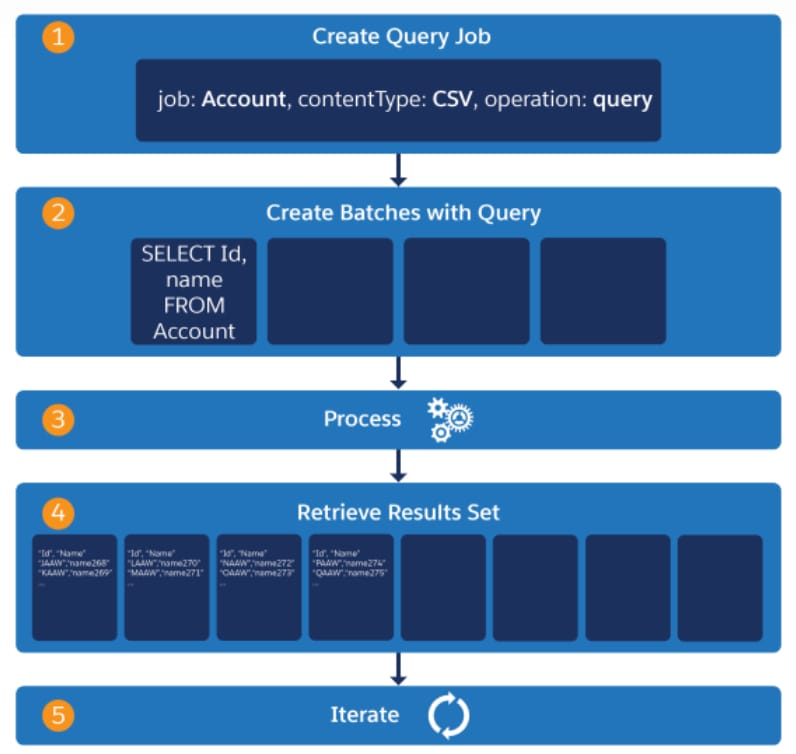
As illustrated in Figure 1, executing a query in Bulk API 1.0 followed a 5-step iteration cycle:
- Create Query Job: Post a job request defining target object, content type (CSV/XML), and operation (`query`).
- Create Batches with Query: Post the SOQL string (`SELECT Id, Name FROM Account`) into batch slots. For massive datasets, developers had to manually configure PK Chunking headers to force Salesforce to split records across generated batches.
- Asynchronous Batch Processing: Salesforce queues and processes each batch independently.
- Retrieve Batch Result Sets: Client polls each batch status, receives an array of result IDs, and requests individual result payloads batch-by-batch.
- Client-Side Iteration & Aggregation: Client loops through all batch files, handles failures per batch, and stitches files together.
Bulk API 2.0 Query Workflow: Streamlined Single-Response Stream
Bulk API 2.0 eliminates manual batch creation and client-side chunk management altogether.
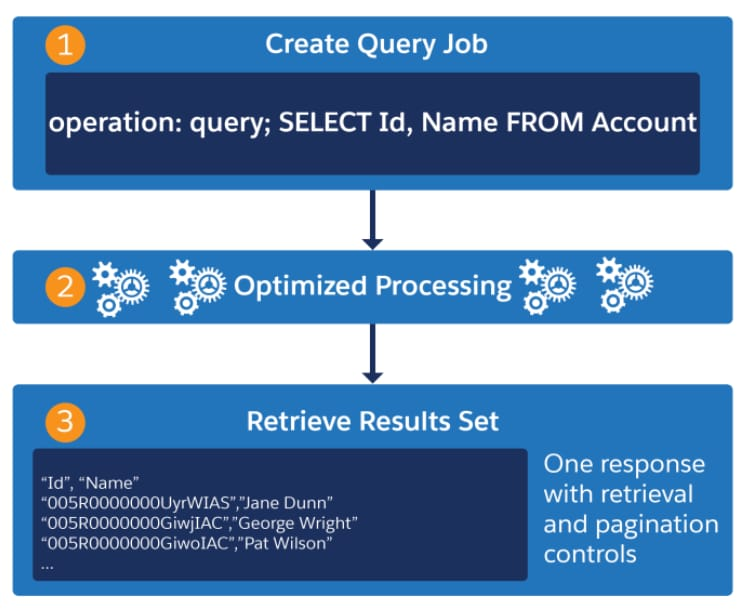
As shown in Figure 2, Bulk API 2.0 shrinks the data extraction lifecycle down to 3 frictionless steps:
- Create Query Job: Submit a single POST request containing the SOQL query string (`operation: query; SELECT Id, Name FROM Account`).
- Automated Server-Side Processing: Salesforce automatically calculates query execution plans, applies internal chunking algorithms, and executes tasks across multithreaded cloud workers.
- Retrieve Unified Result Set: Receive a clean, paginated HTTP stream. If the result exceeds 1 GB, Salesforce provides a `locator` header parameter to effortlessly fetch the next page of records in sequence.
2Ingestion Mechanics: Data Loading & Chunking
Data loading (inserting, updating, upserting, or deleting records) underwent a similar transformation.
Bulk API 1.0 Ingestion
- Client MUST slice CSV file into max 10,000 records or 10 MB chunks.
- Client posts each chunk individually to `/services/async/XX.0/job/{jobId}/batch`.
- Client sends a separate HTTP call to close the job.
- If a batch fails due to lock contention (UNABLE_TO_LOCK_ROW), client must retry that specific batch.
Bulk API 2.0 Ingestion
- Upload your entire dataset up to 150 MB in a single CSV binary payload.
- Salesforce automatically chunks the CSV into optimal internal batches.
- Salesforce automatically re-orders data to prevent row locking contention on parent objects!
- Close upload with a single status update (`UploadComplete`).
3Governor Limits & Daily Allocations
One of the most compelling reasons to adopt Bulk API 2.0 is how Salesforce counts data usage against org governor limits.
Daily Data Allocation Shifts
Limited to 10,000 batches per 24-hour rolling window. Because each batch could hold up to 10,000 records, uploading small batches (e.g., 500 records per batch) wasted daily quota rapidly!
Measured purely by total record volume processed: up to 150,000,000 records per 24-hour rolling window (or 100,000 jobs per 24 hours). You no longer burn quota based on how data is batched!
4REST API Endpoint & OAuth Alignment
Bulk API 1.0 used a legacy asynchronous endpoint path (`/services/async/XX.0/`). In contrast, Bulk API 2.0 fully integrates with standard Salesforce REST API conventions under `/services/data/vXX.0/`.
Bulk API 2.0 Ingestion Endpoints Code Pattern
// 1. Create Ingestion Job
POST /services/data/v60.0/jobs/ingest
Authorization: Bearer <access_token>
Content-Type: application/json

{
  "object": "Account",
  "contentType": "CSV",
  "operation": "insert",
  "lineEnding": "LF"
}

// 2. Upload CSV Data Stream
PUT /services/data/v60.0/jobs/ingest/{jobId}/batches
Authorization: Bearer <access_token>
Content-Type: text/csv

Name,Phone,BillingCity
"Acme Corp","555-0199","San Francisco"
"Apex Systems","555-0200","New York"

// 3. Mark Job Upload Complete
PATCH /services/data/v60.0/jobs/ingest/{jobId}
Authorization: Bearer <access_token>
Content-Type: application/json

{
  "state": "UploadComplete"
}5Error Handling & Result Retrieval
In Bulk API 1.0, retrieving success and error logs required parsing batch status arrays and fetching individual result XML/CSV files per batch ID.
Bulk API 2.0 simplifies result management with three dedicated REST endpoints per job:
GET /services/data/v60.0/jobs/ingest/{jobId}/successfulResultsReturns CSV of successfully inserted/updated records appended with
sf__Idandsf__Createdcolumns.GET /services/data/v60.0/jobs/ingest/{jobId}/failedResultsReturns CSV of failed records with exact error messages in
sf__Errorcolumn.GET /services/data/v60.0/jobs/ingest/{jobId}/unprocessedrecordsReturns records that were not processed before job cancellation or abort.
6Side-by-Side Comparison Matrix
| Feature / Capability | Bulk API 1.0 (Legacy) | Bulk API 2.0 (Modern) |
|---|---|---|
| Batch Management | Client must slice data into 10K/10MB batches | Automatic server-side batching & chunking |
| Max Single File Upload | 10 MB per batch request | 150 MB single CSV payload |
| Daily Allocation Limit | 10,000 batches per 24 hours | 150,000,000 records per 24 hours |
| SOQL Query Execution | Requires manual PK Chunking configuration | Automatic server-side parallel query engine |
| Query Result Retrieval | Multiple batch result files requiring client loop | Single paginated stream with `locator` controls |
| API Endpoint Protocol | `/services/async/XX.0/` (Custom Async API) | `/services/data/vXX.0/` (Standard REST API) |
| Supported Formats | CSV, XML, JSON | CSV (UTF-8 formatted) |
| Row Locking Prevention | Client must sort records manually before upload | Automatic server-side row lock avoidance sorting |
7Architectural Recommendations & Migration Checklist
Transitioning existing ETL scripts, Middleware connectors (MuleSoft, Boomi, Informatica), or custom Python/Node.js integrations to Bulk API 2.0 yields immediate operational benefits:
- Delete Client-Side Batch Slicing Logic: Remove custom loops that break raw CSVs into 10,000-line chunks. Simply stream your raw CSV payload to Bulk API 2.0.
- Standardize OAuth 2.0 Bearer Tokens: Replace legacy session ID header patterns with standard REST OAuth headers (
Authorization: Bearer <access_token>). - Leverage
locatorParameter for Queries: When pulling multi-gigabyte queries, inspect the HTTP response header forSforce-Locatorto seamlessly fetch subsequent pages. - Monitor Job Status via Webhooks or Polling: Poll
GET /services/data/v60.0/jobs/ingest/{jobId}untilstatetransitions toJobCompleteorFailed.
Need Expert Help Optimizing Your Salesforce Integration Pipeline?
Tattvavid Technologies specializes in high-throughput data engineering, Revenue Cloud integrations, and enterprise Salesforce architecture.

Dipti Kalaria
Visionary Leader & ExpertDipti Kalaria - Visionary Leader & Industry Expert with a passion for business transformation.